gps-details
Garmin Power Modes
Author: Michael George
Created: 29 Aug 2026
Updated: 18 Sep 2026
Introduction
There was initially some debate about the “new” satellite settings on the fenix 9.
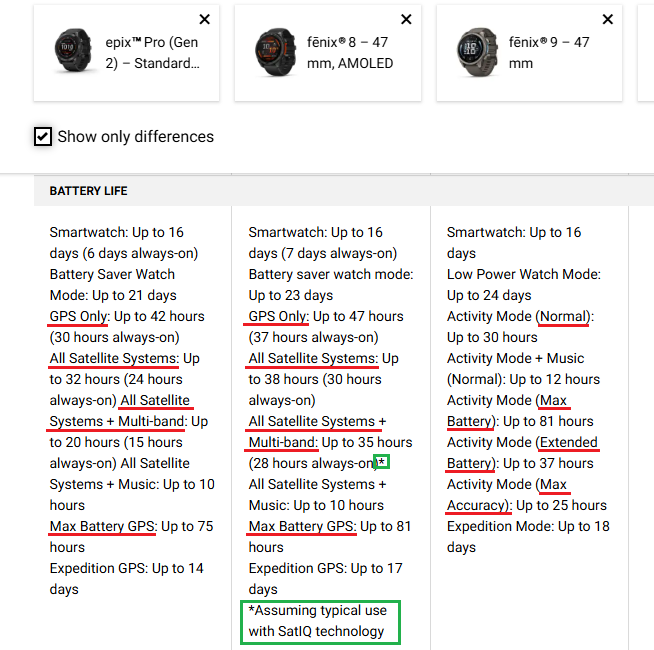
This document shares what has been learned after some basic investigations.
Brief History
Garmin have historically allowed users to choose specific GNSS configurations.
- GPS only
- GPS + GLONASS
- GPS + Galileo
- All Systems
- All Systems + Multi-Band
With the introduction of multi-band, Garmin also provided a feature called SatIQ to dynamically switch between “all systems” and “all systems + multi-band”. How SatIQ operates under the hood is Garmin proprietary, but my expectation is that they were either using the accuracy estimates from the GNSS chipset (Airoha / Synaptics), or the pseudo range residuals themselves.
Whatever the logic, the effect is that the GNSS receiver switches between “all systems” and “all systems + multi-band” based on the quality of the final solution.
Garmin had previously introduced the concept of “power modes” for the fenix 6, and they have been present on all subsequent models of the fenix. The default satellite settings for each of the power modes are as follows:
| fenix 6 | fenix 7 | fenix 8 | fenix 9 | |
|---|---|---|---|---|
| Normal / Balanced | - | Auto Select 1 | Auto Select 1 | Normal |
| Extended | - | GPS Only | GPS Only | Extended Battery |
| Max Battery | UltraTrac | UltraTrac 2 | UltraTrac 2 | Max Battery |
| Max Accuracy / Performance | - | All + Multi-Band | All + Multi-Band | Max Accuracy |
Notes about some Garmin trademarks:
- SatIQ will “auto select” the right satellite mode for your environment
- UltraTrac will only record track points and sensor data once per minute
New Approach
With the advent of the fenix 9 series, Garmin have had a rethink about GNSS configuration. Everything is now using SatIQ (albeit with more variety) and the names for the satellite settings are more consistent with the names for the activity power modes.
- Max Accuracy (aka Performance)
- Normal (aka Balanced)
- Extended Battery (aka Extended)
- Max Battery
It is possible to diagnose what is actually occurring under the covers thanks to the excellent FIT File Viewer. There is a lot of interesting metadata inside the FIT files produced by Garmin devices, and some time ago I helped to decode the GPS mode changes. Since these findings have subsequently been incorporated into the FIT File Viewer, it is possible to observe the GNSS changes that occur during an activity.
What is immediately apparent when doing some basic testing of the fenix 9 series is that “GPS only” appears to have gone, and so has the traditional “all systems”. The new GNSS configurations include the following:
- All + Multi-Band
- Auto Select - All + Multi-Band, or All Systems, or GPS + Galileo
- GPS + Galileo
Note: The “Auto Select” mode sometimes stops using GLONASS, which is sometimes referred to as “constellation shedding”.
It is also important to note that battery saving modes can also reduce the recording frequency of track points, despite the “every second” recording interval. The “extended battery” mode sometimes records track points every 2 seconds, and “max battery” sometimes records track points every 5 seconds.
There may be some other subtle behaviours that are yet to be observed and documented.
General Observations
The table below used GPS event type 49 (mode change) in FIT files. The observation that location updates can be less frequent than every second were using the built-in windsurfing activity, “normal” power mode, and every second recording.
| Satellite Setting | Observations | Equivalent |
|---|---|---|
| Max Accuracy | Initial GNSS mode: 15571 = GPS L1, GLONASS, QZSS L1, Galileo E1, BeiDou B1I, GPS L5, Galileo E5a, BeiDou B2a, QZSS L5 Location updates every 1 second, adhering to “every second” recording |
All + Multi-Band |
| Normal | Initial GNSS mode: 15571 = GPS L1, GLONASS, QZSS L1, Galileo E1, BeiDou B1I, GPS L5, Galileo E5a, BeiDou B2a, QZSS L5 Occasional downgrades during session: 15569 = GPS L1, QZSS L1, Galileo E1, BeiDou B1I, GPS L5, Galileo E5a, BeiDou B2a, QZSS L5 209 = GPS L1, QZSS L1, Galileo E1, BeiDou B1I 65 = GPS L1, Galileo E1 Location updates every 1 second, adhering to “every second” recording |
Auto Select |
| Extended Battery | Initial GNSS mode: 65 = GPS L1, Galileo E1 Frequent mode changes, but always 65 = GPS L1, Galileo E1 Location updates sometimes every 2 seconds, even with the “every second” setting |
GPS + Galileo |
| Max Battery | Initial GNSS mode: 65 = GPS L1, Galileo E1 Occasional mode changes, but always 65 = GPS L1, Galileo E1 Location updates sometimes every 5 seconds, even with the “every second” setting |
GPS + Galileo |
Notes:
- The new satellite settings are all considered to be SatIQ, and there is no specific SatIQ flag in the mode changes.
- “Extended Battery” and “Max Battery” use GPS + Galileo, but sometimes only record points every 2 or 5 seconds respectively.
- “Normal” and “Max Accuracy” both support multi-band, but “Normal” sometimes reverts to single-band.
- “Normal” has also been observed to stop using GLONASS, sometimes referred to as “constellation shedding”.
Event type 44 can also be observed in FIT files from the fenix 8 series, and fenix 9 series:
- Spotted in several files, typically shortly after start up.
- The data value (when present) is a Garmin timestamp that can be up to 12 mins earlier.
- Perhaps it is something to do with acquisition of the latest ephemeris?
I have yet to determine what GPS event 25 represents, but 2 and 3 are simply loss of the GNSS signals and re-acquisition.
Satellite Settings
There was initially some debate about the “new” satellite settings on the fenix 9, but these are my observations:
| Satellite Mode | Equivalent | Interval (seconds) | Description in fenix 9 owner’s manual |
|---|---|---|---|
| Max Accuracy | All + Multi-Band | 1 | Prioritizes maximum positioning accuracy while reducing battery life. This setting provides increased performance in challenging environments for short-duration activities. |
| Normal | Auto Select | 1 | Balances average positioning accuracy and average battery life. This setting provides the best positioning accuracy while still prioritizing battery life. |
| Extended Battery | GPS + Galileo | 1 or 2 | Balances above-average battery life and below-average positioning accuracy. This setting provides the best battery life while still prioritizing positioning accuracy. |
| Max Battery | GPS + Galileo | 1 or 5 | Prioritizes maximum battery life while reducing positioning accuracy. This setting records track points and sensor data less frequently for long-duration activities. |
Max Accuracy
fenix 9 manual:
Max Accuracy - Prioritizes maximum positioning accuracy while reducing battery life. This setting provides increased performance in challenging environments for short-duration activities.
The “Max Accuracy” setting is essentially the same “All + Multi-Band” on previous models, and not “Auto Select”.
- Mode 15571 = GPS L1, GLONASS, QZSS L1, Galileo E1, BeiDou B1I, GPS L5, Galileo E5a, BeiDou B2a, QZSS L5
Normal
fenix 9 manual:
Normal - Balances average positioning accuracy and average battery life. This setting provides the best positioning accuracy while still prioritizing battery life.
The “Normal” setting is near-identical to “Auto Select” (aka SatIQ) on previous models, and not “All Systems”.
- Mode 15571 = GPS L1, GLONASS, QZSS L1, Galileo E1, BeiDou B1I, GPS L5, Galileo E5a, BeiDou B2a, QZSS L5
- Mode 15569 = GPS L1, QZSS L1, Galileo E1, BeiDou B1I, GPS L5, Galileo E5a, BeiDou B2a, QZSS L5
- Mode 209 = GPS L1, QZSS L1, Galileo E1, BeiDou B1I
- Mode 65 = GPS L1, Galileo E1
The description of “Normal” is also very similar to the description of “Auto Select” in the fenix 7 and fenix 8 manuals:
Auto Select - Enables the watch to use SatIQ™ technology to dynamically select the best multi-band GNSS system based on your environment. The Auto Select setting offers the best positioning accuracy while still prioritizing battery life.
One noticeable difference is that GLONASS is sometimes dropped when using “Normal” (aka “Balanced”).
Extended Battery
fenix 9 manual:
Extended Battery - Balances above-average battery life and below-average positioning accuracy. This setting provides the best battery life while still prioritizing positioning accuracy.
The “Extended Battery” setting uses “GPS + Galileo”, and not “GPS Only”.
- Mode 65 = GPS L1, Galileo E1
It can also use either 1 or 2 second recording interval for track points, even with the “every second” setting.
Max Battery
fenix 9 manual:
Max Battery - Prioritizes maximum battery life while reducing positioning accuracy. This setting records track points and sensor data less frequently for long-duration activities.
The “Max Battery” setting uses “GPS + Galileo”, and not “GPS Only”.
- Mode 65 = GPS L1, Galileo E1
I initially expected “Max Battery” to be similar to UltraTrac, but it records much more frequently. It can use either 1 or 5 second recording interval for track points, even with the “every second” setting.
The phrase “records track points and sensor data less frequently” also appears in the fenix 7 and fenix 8 manuals:
UltraTrac - Records track points and sensor data less frequently. Enabling the UltraTrac feature increases battery life but decreases the quality of recorded activities. You should use the UltraTrac feature for activities that demand longer battery life and for which frequent sensor data updates are less important.
It should be noted that “max battery” is NOT the same as the UltraTrac mode.
GPS Software
The GPS software version can sometimes give some insight into whether devices are using GNSS chipsets from the same manufacturer. The fenix 9 series was released with GPS software 11.02 which caused some speculation about there possibly being a new GNSS chipset. However, recent beta software for the fenix 8 series was already using GPS software 11.02.
Right now there is no reason to suspect a significant change in the GNSS chipset, although not impossible. The new satellite settings are an evolution of SatIQ and specific to Garmin. I suspect that Garmin will not implement the new satellite settings on existing models, even if technically possible. Many users would find it confusing, and it would likely result in complaints.
Summary
With the advent of the fenix 9 series, Garmin have rethought their GNSS configurations and enhanced SatIQ. Everything is now considered to be SatIQ, and the names for the satellite settings are more consistent with the names for the activity power modes. This makes a lot of sense from a user perspective, because the average user doesn’t really need to understand different GNSS technologies, or the implications of Garmin concepts such as SatIQ and UltraTrac.
“GPS Only” appears to have been ditched because the “Extended Battery” and “Max Battery” profiles both use “GPS + Galileo”. However, I wouldn’t entirely rule out the possibility of those settings downgrading to “GPS Only” in some scenarios. These findings were confirmed by the GPS Events inside FIT files from the fenix 9 Pro. It is also worth noting that the battery estimates also go a long way to corroborating these findings, and they were helpful prior to any testing.
Whether or not Garmin are still using the Synaptics SYN4778 (chip inside the fenix 8) remains to be seen. Since the fenix 8 and fenix 9 both use the same GPS software version (currently 11.02), I suspect they are both using a Synaptics chipset. The only way to know for sure is to open up the watch and to have a proper look. Hopefully Ferhad Fidan will treat us to a teardown of the fenix 9 some time in the near future!
Links
Garmin forum:
- fenix 9 series satellite settings by Mike K888
- Fenix 9 Position.CONFIGURATION_GPS_xxxxx not supported by F3b Software (Brian)
- fenix 8 Pro - location events stopped mis-session - SW 23.28, GPS 11.02 by Mike K888